
Expiration alerts
See what is due. Know who is reminded.
Recorded expiration dates on each driver file drive reminders to the driver and digest summaries to your carrier team.
Reviewing fleet digests?
Create carrier accountGetting renewal reminders?


14-day free trial. Starts when you create an account in the app.


01 / What starts the clock
Every expiration date lives on the file.
When a carrier records verification, the expiration date stays with that document version. Alerts compare today’s date with what is on file.
Checklist items with dates
Medical certificates, licenses and other dated records carry expiration or renewal dates your carrier tracks.
One timeline per driver
Each driver file rolls its own upcoming dates forward. Fleet views group those dates into reminder windows.
No guesswork on status
Expiring and Expired states use the shared status labels. A reminder does not change compliance by itself.
Countdown track
90
days
12
drivers
60
days
8
drivers
30
days
5
drivers
14
days
3
drivers
02 / How reminders route
Dates become windows, then messages.
The system buckets upcoming dates, queues reminders for drivers and sends carrier digests for the same window.
Expiration recorded
Dec01Medical certificate2026-12-01Countdown windows
Typical windows include 90, 60, 30 and 14 days before expiration. Exact thresholds are awaiting product confirmation.
Reminder queued
14-day windowTiming awaiting confirmation
- Driver app
- Carrier digest
Driver reminder
The driver app shows a renewal task and notification. Delivery channel and timing are awaiting confirmation.
Digest sent
Two-week summary
Carrier digest
Fleet admins receive a summary of items in that window so they can assign follow-up before dates pass.
03 / Who acts next
Remind the driver. Review with the carrier.
Drivers renew documents in the app. Carriers verify submissions and keep the file audit-ready.
Two-week digest
3 drivers · sent today
Driver
Open the renewal task
The driver uploads, scans or fills the assigned form when a reminder arrives.
Carrier
Open the digest
Carrier admins review the window summary and prioritize drivers with the soonest dates.
Both
Verify the new version
A submitted renewal returns to Under Review until the carrier records verification.
The countdown strip
Pick a window. Read the digest.
Each marker shows what carriers see for that reminder window. Select a marker to inspect the digest copy.
Reminder windows
Select a marker to read the carrier digest for that countdown.
Two-week digest
Three drivers have dates inside fourteen days. Review submissions before they become Expired.
- Expiring
Alex Morgan
Medical certificate
- Expiring
Chris Nguyen
Commercial driver license
- Expired
Luis Ortega
Medical certificate
- Digest channels
- Push, email and in-app · daily

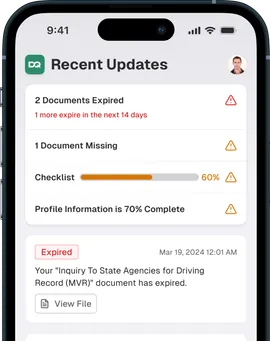
01Fleet view and inbox1 of 1
Buckets on the timeline. Events in the feed.
The expiration timeline groups drivers by how soon dates arrive.
The notification feed collapses digests and surfaces items that need carrier action.
Do reminders guarantee delivery?
Reminders depend on recorded dates, configured windows and confirmed delivery channels. They help your team prepare; they do not replace carrier review.
Setup, limits and privacy
Alerts have boundaries, too.
Confirm reminder settings with your carrier before relying on them for audit preparation.
Windows are configurable
Day thresholds, quiet hours and digest frequency are awaiting confirmation. The markers on this page illustrate the idea, not a legal schedule.
Reminders are not verification
An Expiring label flags an upcoming date. The carrier still verifies each new submission.
Confirm who receives digests
Digest recipients, channels and retention are awaiting confirmation. Limit access to fleet admins who should see driver-file summaries.
Before you turn alerts on.
Who gets the driver reminder?
Who sees the carrier digest?
Does a reminder mean the file is Compliant?
Can we change the day windows?
Continue with audit readiness and fleet tools.
- Related solutionAudit ReadinessBe ready for every DOT audit.
- Related featureCarrier WorkspaceWhat an admin can act on.
- Related resourceFree Checklists & TemplatesStarting material you can use today.
- Related guideMedical certificate and National Registry checksPhysical qualification, examiner certification, CDLIS medical status after June 2025, and what carriers file under 49 CFR 391.41, 391.43, 391.45, and 391.51.
- Related glossaryMedical examiner's certificateProof that a driver meets medical qualification standards, and how carriers file it since the 2025 National Registry change.

Stay ahead of the next expiration date.
Start with the role you use to manage reminders.
Reviewing fleet digests?
Create carrier accountGetting renewal reminders?
14-day free trial. Starts when you create an account in the app.