Ask across the driver files
Find drivers whose medical cards expire this month. Review the matches in the workspace, then approve the follow-up requests.

Carrier workspace
See what needs review, open the driver file and manage the checklist behind your DOT driver-qualification work.
Managing driver files?
Create carrier accountSending your documents?


14-day free trial. Starts when you create an account in the app.


01 / Bring the work together
The workspace brings driver records, checklist items and document states into the same review flow.
Open a driver’s record to follow their assigned checklist and submissions.
A default template is read-only. Duplicate it before customising the required items.
Keep the source document beside its dates, version and recorded review state.
Northline Freight Co.
Workspace overview
02 / Follow the review
A dashboard number is a starting point. Open the underlying checklist item before making a review decision.
Checklist item
Application form
Awaiting driver submission
A checklist item without a submission still needs a document from the driver.
Document comparison
Source file
A submission waits Under Review while the carrier checks the document and its details.
Item review
Verification recorded
The item’s state is updated after review.
The carrier records verification for the individual item. A file-level score is a separate summary.
03 / Who acts next
The driver sends the requested record. The carrier checks it. Both can follow what the file still needs.
Next in the review queue
Driver
Open the assigned item in the app and upload, scan or fill its form.
Carrier
Compare the submission with its metadata before recording verification.
Both
Confirm the carrier’s required items and the people who may manage them. Permission scope depends on the confirmed account setup.
The admin window
Choose a permission to try Admin and Reviewer access, or open Template builder to change the checklist. Changes stay on this page; nothing is saved to an account.
Workspace controls
Changes stay on this pagePermissions and checklist
Select the control you want to explore.
Review documents
Compare a source document with its recorded details before verification.
Admin
Allowed in this illustration
Reviewer
Allowed in this illustration
Role names and permission scope await confirmation. This control does not grant access to a real driver file.
Manage templates
Duplicate a default checklist and customise the required items.
Admin
Allowed in this illustration
Reviewer
Not allowed in this illustration
Role names and permission scope await confirmation. This control does not grant access to a real driver file.
Manage team access
Confirm who should have access to driver-file work.
Admin
Allowed in this illustration
Reviewer
Not allowed in this illustration
Role names and permission scope await confirmation. This control does not grant access to a real driver file.
Template builder
A duplicate checklist you can customise. Include or remove an item to recalculate the weighted score.
Commercial driver license
Weight 50
Medical certificate
Weight 30
Application form
Weight 20

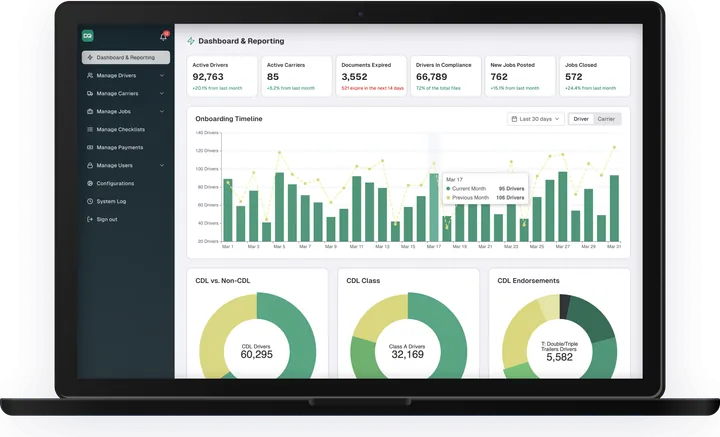
01From overview to driver1 of 1
Start with the fleet overview, then open the driver card to see the checklist behind the summary.
Compliance percentage and profile completion describe different things. Neither replaces checking the individual documents.
No. The carrier still checks the underlying documents. A score summarises the illustrated checklist; it does not guarantee audit readiness.
AI and MCP for the workspace
Ask across your driver files in plain language, review the matches, then approve the follow-up. Confirmed capabilities only; available connections and permissions are awaiting product confirmation.
Find drivers whose medical cards expire this month. Review the matches in the workspace, then approve the follow-up requests.
Connect carrier tools through MCP with confirmed capabilities only. Permissions follow the roles you set in the workspace.
Setup, access and limits
Set the checklist and confirm who should work with personal driver documents.
Admin and Reviewer are the roles shown here. Exact permission names, defaults and available controls await confirmation.
Item weights and review states are awaiting confirmation. Production scoring, exemptions and template behaviour need confirmation.
A submitted document, completed profile or dashboard total does not establish compliance. The carrier checks and records the review.
Create your carrier account and start with your team’s driver-file work.
14-day free trial. Starts when you create an account in the app.